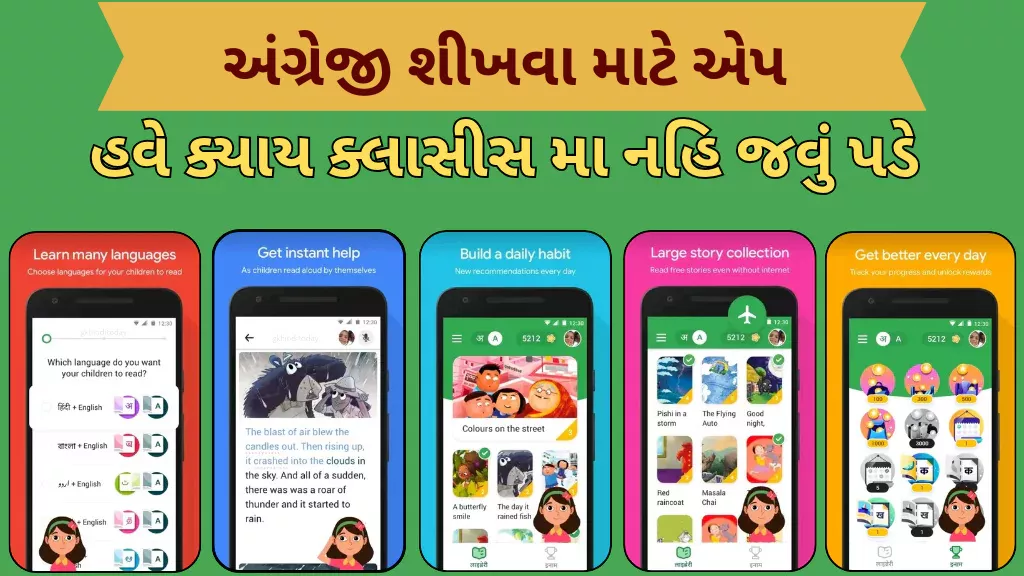
Read Along by Google : In a world increasingly driven by digital learning, Read Along stands out as a powerful, free, and fun tool for children to learn reading and build foundational literacy skills. Developed by Google, this app transforms reading practice into an interactive journey — with games, stories, and a friendly reading buddy — helping kids become confident readers.
What is Read Along?
- Read Along is a free reading-tutor app from Google that helps children practise reading aloud using speech-recognition technology.
- The app originally launched in India under the name “Bolo” in 2019, later rebranded globally as Read Along.
- It supports a wide variety of languages, making it useful for multilingual kids: English, Hindi, Bengali, Gujarati, Marathi, Tamil, Telugu, Urdu — among others.
Why Read Along Is Popular Among Parents and Teachers
- The app includes a virtual reading buddy named “Diya.” As a child reads aloud, Diya listens, instantly recognizes if they stumble, and offers help or encouragement — just like a teacher or parent.
- Read Along makes reading engaging by offering stories, simple word games, and rewards like stars and badges to keep motivation high.
- It works offline after initial download — so children can read without needing a constant internet connection. Perfect for households with limited data.
- The app is safe and ad-free, with no in-app purchases. Voice data is processed locally on the device — nothing gets uploaded to servers — offering more privacy and security for kids.
Impact & Benefits for Kids’ Learning
- Read Along isn’t just an app — it’s already helping millions of children around the world. According to Google, after using Read Along, many early readers improved their reading fluency significantly (some by 38 % to 88 %) after enough practice time.
- Especially helpful during school closures or lack of access — Read Along allows learning at home, enabling kids to practice reading independently and at their own pace.
- The app supports multiple child profiles on the same device. This helps families track progress individually for each child, making it a flexible tool for households with more than one learner.
How to Use Read Along – Quick Guide
- Download the Read Along app from the Google Play Store (Android) or access via its website version (for desktop).
- Open the app — no sign-in is required.
- Choose a child profile (you can create multiple profiles for multiple children).
- Select a story or book to read aloud.
- As the child reads, Diya will listen and give instant feedback — help with pronunciation or encouragement when they succeed.
- Kids receive stars or badges as they progress — keeping motivation hig
- The app runs offline once content is downloaded; connect to data/Wi-Fi only when you want to download more stories.
- Rozgaar Bharti Melo 2026: Various Posts, Eligibility, Salary, Walk-in Interview
- India Post GDS Recruitment 2026: Apply Online for Gramin Dak Sevak Posts

- POWERGRID Apprentice Recruitment 2026: Apply Online for 119 Vacancies

- Rajkot Government Press Apprentice Recruitment 2026 – Apply Offline for 24 Posts
- IOB Local Bank Officer Recruitment 2026: Apply Online for 250 LBO Posts

- SBI Clerk Recruitment 2026: 9,124 Junior Associate Vacancies, Apply Online

Relevance in Today’s Scenario
With children’s education increasingly shifting toward digital tools, Read Along is widely seen as an effective, low-cost, and scalable solution — especially in rural or resource-limited areas. Governments and educators have used it under literacy missions to support reading skills among children.
For parents, Read Along offers a convenient way to supplement formal schooling — helping children practice reading at home, building confidence, and fostering a love for books from early age.
Important links
| Read along by google app | Download |
| Home page | Click here |
Conclusion
Read Along by Google is more than just a reading app — it’s a friendly, reliable companion that helps children build foundational reading and comprehension skills with fun, games, and encouragement. It’s free, offline-friendly, safe, and suitable even for entry-level smartphones.
If you have kids around ages 5–11, or you know parents looking for a simple way to improve their child’s reading at home — Read Along is absolutely worth trying.